

Introduction
A smartphone maintenance checklist sounds like overkill. It isn’t. Small, regular habits protect your battery. They protect your storage, your security, and your screen too. Skip them, and problems creep in slowly. One day the phone just feels broken.
This guide breaks maintenance into simple habits. Daily, weekly, monthly, and seasonal. None take more than a few minutes. Follow even half of this smartphone maintenance checklist. Your phone will run faster and last longer.
Why a Smartphone Maintenance Checklist Actually Matters
Phones don’t fail all at once. They fail slowly. Dust builds in the charging port. Storage fills with old photos. Software falls a few versions behind. Each issue seems small alone. Together, they shorten your phone’s useful life.
A consistent smartphone maintenance checklist catches these issues early. Early fixes cost nothing. Late fixes often mean a repair bill, a slow phone, or lost data. Regular care wins every single time.
Daily Smartphone Maintenance Checklist

Daily habits take seconds. They protect your phone every time you pick it up.
- Wipe the screen with a dry microfiber cloth. This removes oils and dust from daily handling.
- Check your battery percentage before heavy use. This helps you plan charging around your day.
- Close unused background apps occasionally. This frees up memory and can improve speed.
- Avoid charging overnight every single night. Occasional overnight charging is fine. A nightly habit adds unnecessary heat over time.
Weekly Smartphone Maintenance Checklist
Weekly habits go a bit deeper. They still take only a few minutes.
Restart Your Phone Weekly
A full restart clears background processes. These build up over days of use. It’s a simple fix for a sluggish phone. It costs nothing to try.
Check Available Storage Weekly
Open your storage settings once a week. Delete photos, videos, or apps you don’t need. A drive above 90% capacity slows the whole phone down. Catching this early keeps performance steady.
Review Recent App Downloads
New apps sometimes ask for more permissions than they need. A quick weekly check catches this fast. Remove anything unfamiliar before it becomes a habit you forget about.
Monthly Smartphone Maintenance Checklist
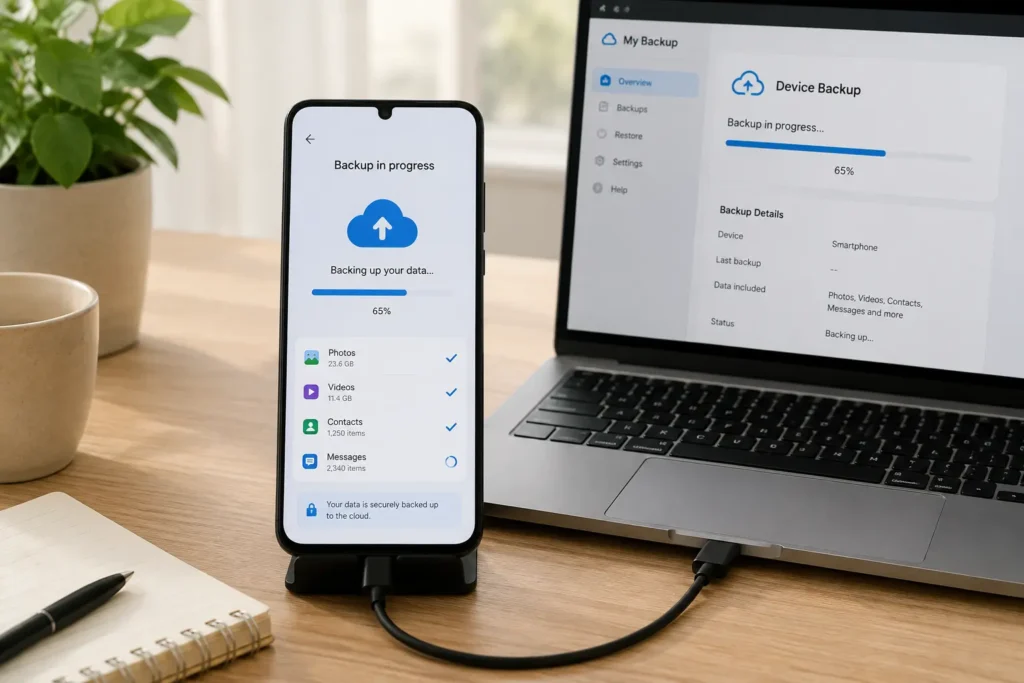
Monthly maintenance protects your data and hardware over the long run.
- Update your operating system. Updates patch security gaps. They often improve battery efficiency too.
- Update all your apps. Outdated apps behave unpredictably sometimes. Some carry known security flaws.
- Back up your photos and files. Use cloud storage or a computer. A lost phone should never mean lost memories.
- Clean your charging port. A soft brush or compressed air clears lint. This builds up over weeks of pocket use.
- Check your battery health setting. Both iPhone and Android show this in settings. A steep decline is worth noting.
Seasonal Smartphone Maintenance Checklist
A few tasks only need attention every few months. They matter just as much as the weekly habits.
Every three months:
- Deep clean the case, buttons, and speaker grilles with a soft brush.
- Review all app permissions, not just recent downloads.
- Check your screen protector for scratches or peeling edges.
Every six months:
- Review your passcode and two-factor authentication settings.
- Confirm your cloud backup is actually running, not just enabled once.
- Consider a professional diagnostic if the phone feels slower than before.
Battery Health Maintenance Checklist
Your battery takes the most damage from daily habits. It’s also the part people neglect most. A few habits protect battery health over the phone’s whole lifespan.
Avoid letting the battery drop to 0% regularly. Deep discharges add extra strain. Avoid leaving the phone at 100% for long stretches too. Heat and a full charge together speed up wear.
Remove thick cases while charging, especially with a fast charger. Trapped heat is the real long-term threat here. Our guide on fast chargers and what you should know covers this in more depth.
Security and Privacy Maintenance Checklist
Security deserves its own spot on this smartphone maintenance checklist. A breach costs far more than a slow phone ever would. The Cybersecurity and Infrastructure Security Agency publishes a Mobile Device Cybersecurity Checklist for Consumers. It covers this exact topic in detail. Its core recommendations line up closely with what we suggest here.
- Use a strong passcode or biometric lock. Set your auto-lock timer to a short window too.
- Enable two-factor authentication on important accounts. An authenticator app beats text messages here.
- Review app permissions regularly. Revoke camera, microphone, or location access apps don’t truly need.
- Only install apps from official app stores. Third-party sources carry much higher malware risk.
- Keep your operating system updated. Security patches close known vulnerabilities fast.
Hardware Care: The Physical Side of Maintenance
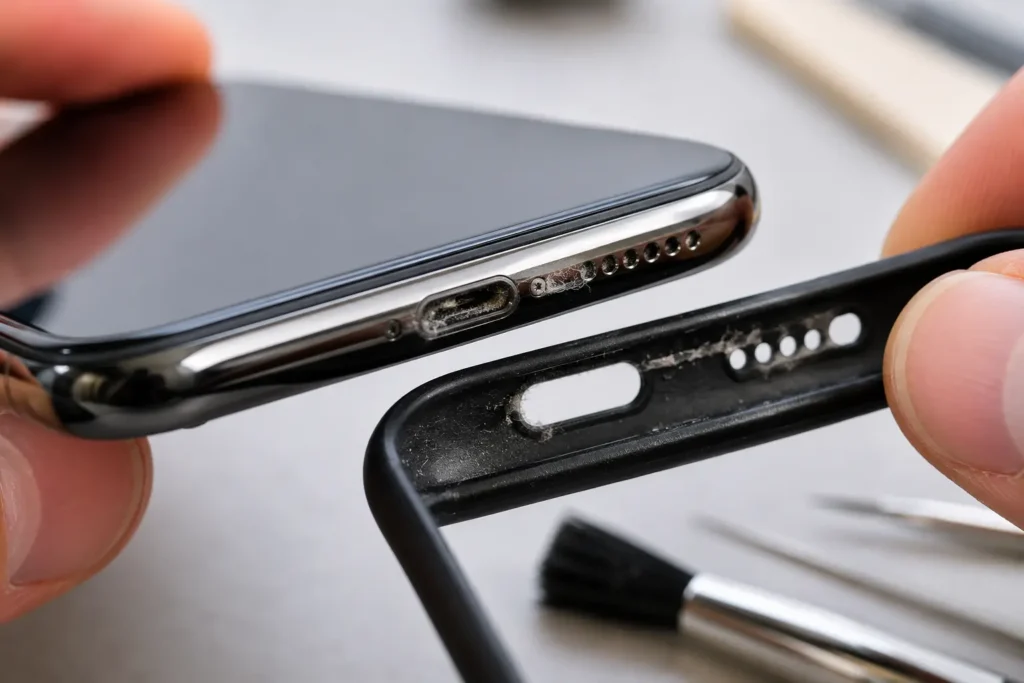
Software habits matter. The physical device needs attention too.
- Check your case for cracks or a loose fit. A damaged case offers far less real protection than it looks.
- Inspect your charging port with a flashlight monthly. Lint buildup causes many charging complaints we see at our Raleigh shop.
- Clean speaker and microphone grilles gently. Dust here can muffle call quality over time.
- Watch for a screen that responds slower than usual. This can point to a screen protector issue, not the phone itself.
Smartphone Maintenance Checklist for Older Phones
Older phones need a slightly different approach. Battery capacity naturally declines with age, so checking battery health monthly instead of quarterly makes sense. Storage tends to fill up faster too, since years of photos and apps accumulate over time.
Consider archiving old photos to a computer or external drive rather than deleting them outright. This frees up space without losing memories. An aging phone running the latest software update sometimes runs slower than before, so check user reports before updating a phone that’s already a few years old.
A battery replacement often extends an older phone’s useful life by a year or more, and it costs far less than a full replacement. This single fix is worth considering once battery health drops below 80%.
Tools You’ll Need for Smartphone Maintenance
Most maintenance tasks need almost nothing in the way of equipment. A microfiber cloth handles the screen and body. A soft-bristled brush, like a clean, unused toothbrush, works well for grilles and ports. A can of compressed air clears stubborn lint from tight spaces.
Skip anything sharp or metal near the charging port or speaker openings. These tools risk scratching delicate components or bending internal pins. A small flashlight helps you inspect ports and grilles for buildup you can’t see under normal room lighting. None of these items cost much, and most households already own everything needed for a complete smartphone maintenance checklist.
Building Your Own Smartphone Maintenance Routine
Turning this checklist into an actual habit takes a bit of planning. Pick one recurring reminder for weekly tasks, like every Sunday evening. Pick a second reminder for monthly tasks, like the first of each month. Most phones let you set a recurring calendar reminder in under a minute.
Pairing maintenance with an existing habit works well too. Clean your screen while your coffee brews. Check storage while you wait for a show to load. Small pairings like these turn a checklist into a routine that sticks without feeling like extra work.
Tracking your habits for the first month or two helps build consistency. A simple note in your phone, checked off weekly, shows real progress over time. After a couple of months, most people find these habits become automatic, requiring no real thought or reminder at all.
Smartphone Maintenance Checklist for Travel
Travel adds a few extra considerations worth folding into your regular routine. Back up your photos before any trip, not just monthly, since travel photos are often the ones people regret losing most. Charge your phone to a moderate level before heading to the airport, rather than topping off to 100% right before a long security line.
Bring a certified cable and charger rather than relying on unknown public charging stations, since public USB ports carry some data-security risk alongside basic charging function. Turn on airplane mode with Wi-Fi enabled when possible, since this reduces battery drain from constant cellular searching in areas with weak signal. A portable power bank matched to your phone’s charging standard rounds out a solid travel routine, especially on longer trips away from reliable outlets.
How Weather and Environment Affect Your Maintenance Routine
Climate plays a bigger role in smartphone care than most people realize. Hot, humid environments accelerate battery wear and encourage moisture buildup inside ports and speaker grilles. Cold weather temporarily reduces battery percentage readings and can cause unexpected shutdowns in extreme conditions, even when the battery itself is healthy.
Homes with pets tend to see faster dust and hair buildup around charging ports and speaker grilles, which means a monthly cleaning check makes more sense than a quarterly one. Coastal environments introduce salt air, which can accelerate corrosion on charging contacts over time, making a slightly more frequent port inspection worthwhile for anyone living near the water.
What Skipping Maintenance Actually Costs
A little math makes the case for regular care clearly. A charging port cleaning takes five minutes and costs nothing. Ignoring lint buildup for a year can lead to a damaged port, which often means a paid repair instead of a free fix. A battery kept at extreme charge levels for years may need early replacement, while a well-maintained battery can last the phone’s entire useful life.
Storage neglect carries its own cost too. A phone that’s constantly full runs slower across every single task, from opening apps to taking photos. This isn’t a hardware problem at all, yet it feels exactly like one to the person using the phone daily. A five-minute monthly storage check prevents this entirely, at no cost beyond the time it takes.
Security neglect is the costliest category of all. A single compromised account, or a phone lost without a passcode, can lead to real financial and personal harm. Compare that risk to the few minutes it takes to set a strong passcode and enable two-factor authentication, and the math clearly favors prevention every time.
Apps and Built-In Tools That Help
Both iOS and Android include built-in tools that support a solid smartphone maintenance checklist without installing anything extra. Storage management screens show exactly which apps and file types take up the most space, making cleanup decisions much easier. Battery health screens track charge cycles over time, giving you a clear number instead of a vague feeling that the phone “seems” to drain faster.
Built-in backup tools, like iCloud and Google’s backup service, handle most people’s needs without any third-party app at all. Digital wellbeing or screen time tools, originally built for usage tracking, double nicely as a reminder that it’s been a while since you checked your settings menu. Sticking with these built-in options avoids adding yet another app that itself needs updates and permission reviews down the line.
Common Smartphone Maintenance Mistakes
A few habits undo the benefits of an otherwise solid maintenance routine.
- Using harsh cleaning chemicals on the screen. Stick to a dry or slightly damp microfiber cloth instead.
- Ignoring storage warnings for months. A nearly full phone slows down every single task you try to run.
- Skipping backups until something breaks. By then, it’s often too late to recover what mattered most.
- Charging with cheap, uncertified cables. These wear out faster and can damage your charging port over time.
- Never restarting the phone. Some people go weeks without a restart, letting background clutter pile up unnecessarily.
When DIY Maintenance Isn’t Enough
Regular maintenance prevents most problems. Not every issue responds to cleaning and updates alone. A phone that stays slow after a full cleanup may need a deeper look. A battery that drains fast despite good habits may have declined past the point routine care can fix.
Quick Phone Repair & Designs offers free diagnostics at both our North Raleigh and South Raleigh locations. Find out exactly what’s going on before committing to any repair. Our guides on common iPhone screen problems, Samsung Galaxy problems, and Google Pixel problems cover issues maintenance alone can’t always solve.
The Complete Smartphone Maintenance Checklist at a Glance
Daily: Wipe the screen. Check battery level. Close unused apps. Avoid nightly overcharging.
Weekly: Restart the phone. Check storage space. Review new app permissions.
Monthly: Update the OS and apps. Back up your photos. Clean the charging port. Check battery health.
Every 3 months: Deep clean the case and grilles. Review all app permissions. Check the screen protector.
Every 6 months: Review security settings. Confirm cloud backup is active. Consider a professional diagnostic.
Print this list, save it, or bookmark this page. A five-minute habit today saves a much bigger headache down the road.
Smartphone Maintenance and Repair Help in Raleigh, NC
Quick Phone Repair & Designs offers free diagnostics at both our North Raleigh and South Raleigh locations. This covers anything your own maintenance checklist can’t resolve. Our technicians handle screen repairs, battery replacements, charging port cleaning, and full device checkups. Most repairs finish the same day you walk in.
We serve Raleigh, Garner, Wake Forest, Knightdale, Cary, Durham, Apex, Clayton, Morrisville, and the surrounding Triangle area. Walk-ins are welcome. You can also book an appointment online or get an instant quote before your visit.
North Raleigh: 3111 Leland Dr, #110, Raleigh, NC 27616 — (919) 295-1397 South Raleigh: 6213 Rock Quarry Rd, #106, Raleigh, NC 27610 — (919) 307-8600
If your phone has already run into trouble, our guide on recovering photos from a broken phone and our breakdown of a dirty charging port vs. a damaged one can help you sort out what’s going on.
Frequently Asked Questions
How often should I follow a smartphone maintenance checklist?
Daily habits take seconds. Weekly habits take a few minutes. Monthly and seasonal tasks round things out. Together they take less time per month than a single repair visit would.
What’s the single most important smartphone maintenance habit?
Keeping your operating system updated matters most. It covers security patches and performance improvements in one simple step.
Can regular maintenance really extend my phone’s battery life?
Yes. Avoiding extreme charge levels helps. Removing your case while fast charging helps too. Keeping the phone cool slows down battery wear measurably over time.
Do I need special tools for smartphone maintenance?
No. A microfiber cloth, a soft brush, and occasional compressed air cover almost everything on this checklist.
When should I stop doing maintenance myself and see a professional?
If a problem persists after a full cleanup, restart, and update, it’s time for a diagnostic. The same goes for physical damage like a cracked port or a swollen battery.
Does a smartphone maintenance checklist differ for iPhone versus Android?
The core habits stay the same across both. Menu names and settings locations differ slightly, but cleaning, updating, and backing up matter equally on any platform.
How much time does a full smartphone maintenance checklist actually take per month?
Daily habits add up to a few minutes a week. Weekly and monthly tasks combined take roughly 20 to 30 minutes a month. That’s a small time investment compared to the hours lost to a slow phone or a preventable repair.
Final Thoughts on Building a Smartphone Maintenance Checklist
A smartphone maintenance checklist works best as a habit, not a one-time project. Start small if the full list feels like a lot at once. Pick just the daily and weekly items first, then add monthly and seasonal tasks once those feel automatic.
The goal isn’t perfection. Missing a week here or there won’t undo months of good habits. What matters is building a routine that catches small issues before they turn into bigger, costlier problems down the road.