
Introduction
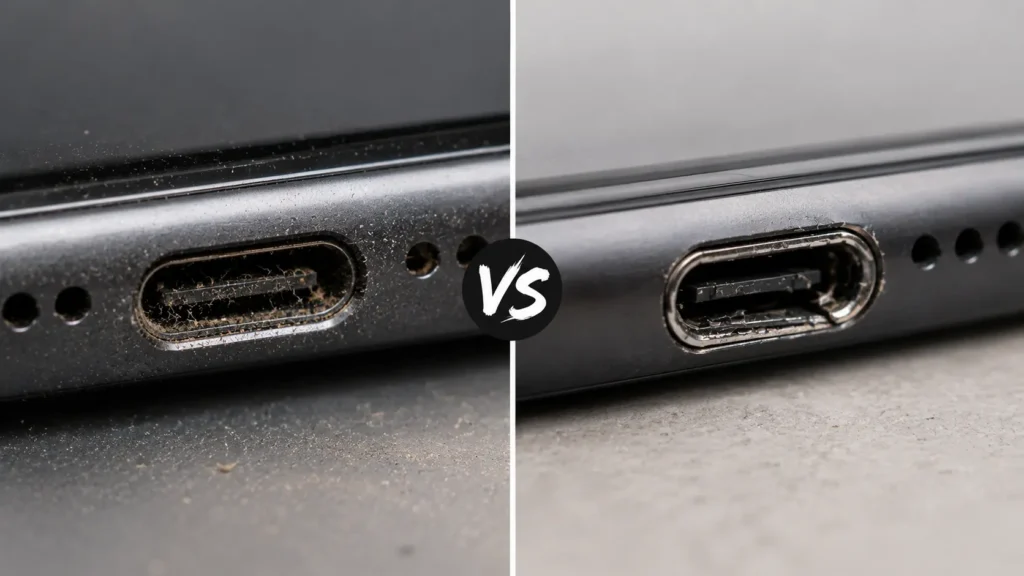
Dirty Charging Port vs. Damaged Charging Port: You plug your phone in before bed. Wake up, and the battery is still at 12%. Or maybe the cable only charges if you hold it at a strange angle. Or the charging icon flickers on and off like it can’t decide whether it’s actually connected. The first thought most people have is “great, my charging port is broken”. The second thought is usually “how much is this going to cost me?”
Here’s the good news: in a large share of the charging complaints we see at Quick Phone Repair & Designs. The port isn’t damaged at all. It’s dirty. Pocket lint, dust, and compacted debris are remarkably effective at blocking a charging connection. They build up in a port without anyone noticing until charging becomes unreliable. But a genuinely damaged port with bent pins, corrosion, or a connector that’s come loose from the logic board is a real and different problem. One that usually gets worse if you keep charging the phone the way you have been.
This guide walks through exactly how to tell a dirty port from a damaged one, how to safely check and clean your own device, and when it’s time to stop troubleshooting and bring the phone in for a professional repair. If you’re in the Raleigh, NC area including Garner, Wake Forest, Knightdale, Cary, Durham, Apex, Clayton, or Morrisville Quick Phone Repair & Designs offers same-day charging port diagnostics and repair at both our North and South Raleigh locations.
Why the Distinction Actually Matters
It’s tempting to treat “my phone won’t charge” as a single problem with a single fix, but dirt and damage call for completely different responses. A dirty port can usually be cleaned safely in a few minutes with the right tool and costs nothing. A damaged port needs professional repair, and continuing to force a cable into a damaged port or charging on a bad angle to compensate tends to make the underlying damage worse over time.
Getting the diagnosis wrong in either direction causes real problems. If you assume a dirty port is “broken” and pay for a full port replacement, you’ve spent money you didn’t need to spend. If you assume a damaged port is “just dirty” and keep digging around in it or forcing the cable in at an angle, you risk turning a straightforward connector repair into a much bigger motherboard-level repair.
Signs Your Charging Port Is Just Dirty
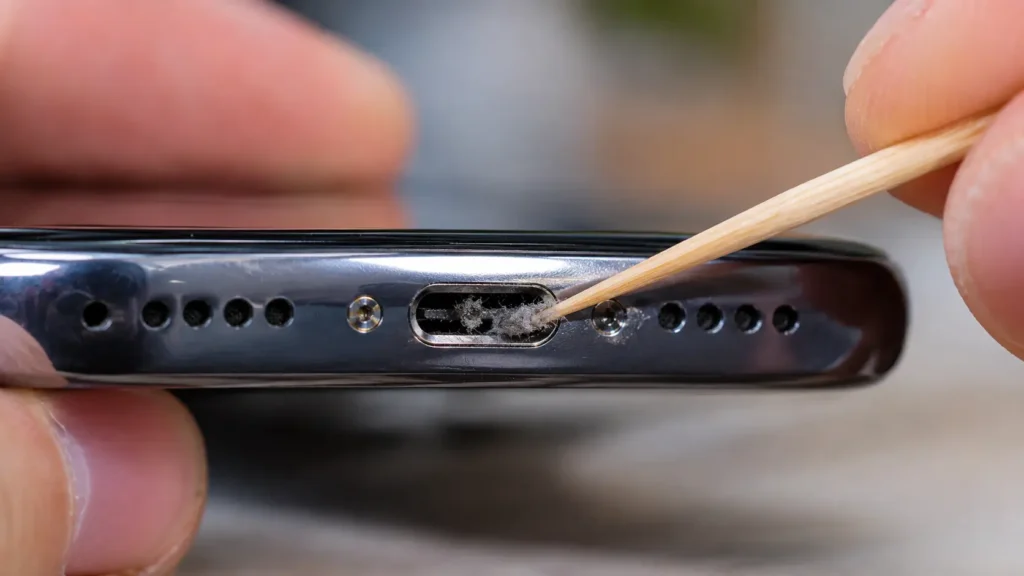
A dirty port has a fairly consistent set of symptoms, and they tend to appear gradually rather than suddenly:
- The cable feels loose or doesn’t click into place, even though it looks like the right connector for your phone.
- You have to wiggle or hold the cable at a specific angle to get charging to start, but once it starts, it usually charges normally.
- Charging is intermittent: it starts, stops, and starts again as the cable shifts slightly in the port.
- You can actually see debris when you shine a flashlight into the port at an angle. Grey, fuzzy lint is the most common culprit, especially on phones that spend a lot of time in pockets, gym bags, or workwear.
- The problem developed slowly, over weeks or months, rather than immediately after a drop or spill.
If most of these apply to you, there’s a good chance a careful cleaning will solve the problem entirely, and you can safely try that before assuming the worst.
Signs Your Charging Port Is Actually Damaged
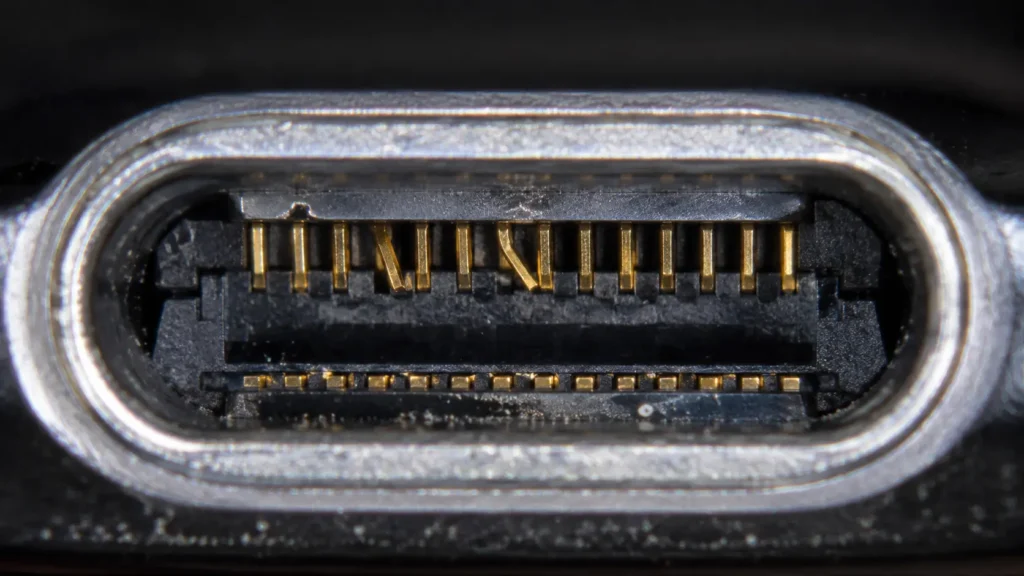
Damage tends to look and behave differently from simple dirt buildup:
- The phone doesn’t charge at all, no matter how you position the cable, and no amount of wiggling helps.
- Charging is dramatically slower than it used to be a phone that once reached a full charge in 90 minutes now takes three or four hours, even with the same charger and cable.
- You notice visible corrosion, discoloration, or a greenish residue inside the port, which usually points to past moisture exposure.
- The pins inside the port look bent, misaligned, or pushed to one side when you look closely with a flashlight.
- The connector feels loose or wobbly inside the phone itself, as if the port isn’t firmly anchored to the internal circuit board anymore.
- The problem appeared suddenly, often right after a drop, a spill, or an attempt to force in a cable that didn’t quite fit.
- The port works fine with one cable but not another, and swapping to a known-good charger and cable on a different device doesn’t reproduce the problem which points to the port, not your charging accessories.
If several of these describe what you’re experiencing, cleaning alone is unlikely to fix it, and continued use can make things worse.
Dirty Port vs. Damaged Port: Side-by-Side Comparison
| Symptom | Dirty Port | Damaged Port |
|---|---|---|
| Onset | Gradual, over weeks/months | Often sudden, after a drop or spill |
| Visible debris | Yes, lint, dust, fuzz | Sometimes corrosion, bent pins |
| Cable fit | Loose, needs wiggling | Loose, wobbly, or won’t seat at all |
| Charging speed | Normal once connected | Noticeably slower or non-existent |
| Works with other cables | Usually improves with any cable once cleaned | Problem persists across multiple cables |
| Fixable at home | Yes, with gentle cleaning | No, needs professional repair |
| Risk of waiting | Low, if cleaned promptly | Higher can worsen with continued use |
How to Safely Test Which One You Have
Before you clean anything or assume the worst, run through this quick diagnostic sequence:
- Try a different cable and charger. If you have access to a second certified cable genuine Lightning or MFi-certified for iPhone, or a quality USB-C cable for Android and newer iPhone models try it. If charging works fine with a different cable, your original cable (not the port) may be the actual problem.
- Inspect the port with a flashlight. Hold your phone at an angle under bright light and look straight into the port opening. Lint typically looks like grey or dark fuzz. Bent pins, a greenish residue, or anything that looks structurally out of place points toward damage rather than dirt.
- Test the cable on another device. If you have a friend’s phone or a second device with the same port type, try your cable and charger there. If it charges normally on another device, the issue is very likely isolated to your phone’s port not your accessories.
- Note how the phone behaves when it does connect. A dirty port that makes contact usually charges at a normal speed once the connection is stable. A damaged port often charges slowly or inconsistently even when the cable appears to be seated correctly.
- Check for a software-related cause. Rarely, an outdated operating system can cause the phone to misreport charging status. It’s worth confirming your device is updated before assuming a hardware issue Apple’s official support guidance on charging issues and Samsung’s device care documentation both cover this as a first troubleshooting step.
Dirty Charging Port vs. Damaged Charging Port: How to Clean a Dirty Charging Port Safely
If your symptoms point toward dirt rather than damage, here’s how to clean the port without causing new problems:
- Power off the phone completely. This avoids any risk of a short circuit while you’re working near the connector pins.
- Use a non-metal tool. A wooden toothpick, a plastic SIM-eject-style pick, or a dedicated anti-static cleaning tool works well. Avoid metal paperclips, needles, or tweezers metal tools can scratch the pins or, worse, bend them, turning a cleaning job into actual damage.
- Work at an angle, not straight in. Gently scrape along the bottom and sides of the port to loosen debris rather than pushing straight back, which can pack lint in deeper instead of removing it.
- Use compressed air in short bursts. A can of compressed air, held a few inches away and used in short controlled bursts, can blow loosened debris out of the port. Avoid extended continuous spraying, which can introduce moisture from the can’s propellant.
- Try a soft-bristled brush for stubborn debris. A clean, dry, small brush (like a new, unused toothbrush) can help dislodge compacted lint without applying excessive force.
- Never use liquids of any kind, including alcohol, unless you’re specifically trained in electronics repair. Moisture near the charging pins, even small amounts, can cause corrosion or a short circuit.
- Test with your normal cable after cleaning. If charging is now solid and consistent, the dirt was very likely the whole problem.
Mistakes That Turn a Dirty Port Into a Damaged One
A surprising number of “damaged” charging ports we see started out as simple dirt problems that got worse through well-meaning but risky home fixes. A few things to avoid:
- Forcing a cable in at an angle to “make it work.” This is one of the most common causes of bent pins, since the force gets applied unevenly across the connector.
- Using metal tools to dig out debris. It’s easy to misjudge the pressure needed and end up scratching or bending the delicate internal pins.
- Ignoring a loose-fitting cable for months. A port that requires increasingly aggressive wiggling to charge is trending toward mechanical wear, and continued force accelerates that wear.
- Charging in the shower, near a pool, or in the rain. Steam and moisture are a leading cause of the corrosion that turns a dirty-looking port into a genuinely damaged one over time.
- Using cheap, non-certified cables long-term. Poorly manufactured connectors don’t always match factory tolerances, and repeated use can wear down the port’s internal contacts faster than a properly certified cable would.
When It’s Time for Professional Repair
If cleaning doesn’t resolve the issue, or if your symptoms lined up with the damage list earlier in this guide, it’s time to have the port inspected by a technician rather than continuing to experiment at home. A few specific signs that mean “stop troubleshooting, book a repair”:
- The phone still won’t charge reliably after a careful, gentle cleaning
- You can see visible corrosion or bent pins inside the port
- The connector feels loose or shifts inside the phone’s housing, not just at the cable tip
- The problem appeared suddenly after a drop or liquid exposure
- Charging works, but is dramatically slower than it used to be, even with a known-good cable
At this point, Dirty Charging Port vs. Damaged Charging Port: the fix usually involves replacing the charging port assembly. Which is a precise repair the connector sits close to other internal components, and on many modern phones it’s integrated with a small flex cable or sub-board that has to be handled carefully. This isn’t a repair to attempt with a home toolkit. Both because of the risk to nearby components. Because getting it wrong can turn an affordable port replacement into a much more expensive board-level repair.
What a Charging Port Repair Involves
A professional charging port repair typically includes:
- Full diagnostic testing to confirm the port itself is the problem, rather than the battery, charging circuitry, or a software issue.
- Careful disassembly to access the port without disturbing the battery, logic board, or surrounding components.
- Replacement of the port or connector assembly with a quality-tested part matched to your specific phone model.
- Reassembly and charge testing across multiple cables and power levels to confirm the fix holds under normal use.
- A warranty on the repair, so you’re covered if anything about the new connector doesn’t perform as expected.
At Quick Phone Repair & Designs, most charging port repairs for iPhone, Samsung Galaxy, and Google Pixel devices alike are completed same-day, and we always run a free diagnostic first so you know whether you’re actually dealing with dirt, damage, or something else like a battery or software issue, before you pay for anything.
Preventing Charging Port Problems for Dirty Charging Port vs. Damaged Charging Port
Whether your port turned out to be dirty or damaged, a few habits go a long way toward avoiding a repeat:
- Use certified cables and chargers. For iPhones, that means MFi-certified Lightning or USB-C cables; for Android and Pixel devices, a quality USB-C cable rated for your phone’s charging speed. The USB Implementers Forum sets the official specifications that certified cables are tested against, which is why generic, uncertified cables are more prone to fit and durability issues.
- Plug and unplug gently, straight in and straight out. Avoid yanking the cable out at an angle or letting the weight of the cable pull sideways on the port while it’s charging.
- Keep your phone out of pockets full of lint-generating fabric when possible, or check the port periodically if that’s not realistic.
- Avoid charging in the bathroom during a shower, by the pool, or outdoors in the rain. Steam and moisture are slow but cumulative threats to the port’s internal contacts.
- Check the port with a flashlight every couple of months, especially if you carry your phone in a pocket often. Catching lint buildup early means a 30-second cleaning instead of a fix down the road.
Related Reading
If your charging troubles came bundled with other symptoms, these guides can help you sort out what’s going on with the rest of the phone:
- Common iPhone Screen Problems and How to Fix Them
- Most Common Samsung Galaxy Problems and How to Fix Them
- Common Google Pixel Problems and How to Fix Them
Frequently Asked Questions for Dirty Charging Port vs. Damaged Charging Port
Can I clean my charging port with a toothpick?
Yes, a wooden toothpick is one of the safer household tools for this, as long as you work gently at an angle. Rather than pushing straight in. Avoid metal tools, which can bend or scratch the internal pins.
Why does my phone charge only when I hold the cable at an angle?
This is one of the clearest signs of either a dirty port or early-stage wear on the internal connector. Try cleaning first; if the problem continues after a careful cleaning, the port likely needs professional attention.
Is it safe to use compressed air on a charging port?
Yes, in short controlled bursts held a few inches away from the port. Avoid long continuous spraying, which can push moisture from the can’s propellant into the port.
How much does a charging port repair cost?
Cost varies by phone model and whether the port is a standalone connector or part of a larger sub-board assembly. But it’s typically far less than replacing the entire device. Quick Phone Repair & Designs offers a free diagnostic so you know the real cause before paying for anything.
Can a damaged charging port affect my battery?
Yes. A damaged port can create resistance in the electrical connection. Which slows charging and can cause the battery to charge unevenly or generate excess heat over time.
How long does a charging port repair take?
Most charging port repairs at Quick Phone Repair & Designs are completed same-day. Often within an hour, depending on the model and part availability.